On this page
Quectel EC25 4G Modem Setup
The modem we fly
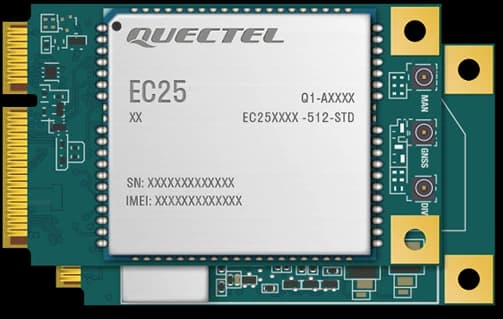
Any 4G modem works with Aircast. This is the one in the starter kits: the Quectel EC25 Mini PCIe card on a USB adapter, with two antennas. Plug it in and the image dials it on its own, with no drivers, no AT commands and no mode switch.
Which EC25 to buy
The EC25 comes in regional variants with different LTE bands. Buy the one for where you fly, and check its band list on the Quectel page against your carrier.
| Variant | Where |
|---|---|
| EC25-EC, EC25-E, EC25-EUX | Europe, including Ukraine and Georgia |
| EC25-AF | North America |
| EC25-AU | Australia, New Zealand and Latin America |
| EC25-J | Japan |
Where to buy
The kit we fly comes from AliExpress: Quectel EC25-EC Mini PCIe with accessories, about $45 to $60. Pick package 4, the only one with the USB adapter. It comes with:
- The EC25 Mini PCIe card
- A Mini PCIe to USB adapter with a SIM slot
- Two pigtails, U.FL to SMA
- Two LTE antennas
Outside Europe, buy the variant for your region from the table above, with a Mini PCIe to USB adapter and two LTE antennas.
Before you start
- The EC25 kit: card, USB adapter, pigtails and antennas
- A SIM card: with an active data plan, and no PIN lock (or know the PIN)
- A Raspberry Pi: flashed with Aircast, powered from a 5V 3A or larger BEC
- A short USB extension cable: optional: keeps the wide adapter off the neighbouring ports and lets you place the antennas
1. Assemble the modem
- Slide the SIM into the slot on the USB adapter.
- Seat the EC25 card in the adapter's Mini PCIe slot at an angle, press it flat and screw it down.
- Snap the pigtails onto the MAIN and DIV connectors on the card. Leave GNSS empty: Aircast takes position from the flight controller.
- Screw an antenna onto each pigtail.
Never power the modem without an antenna on MAIN. Transmitting into an empty connector can damage the modem.
2. Plug it into the Pi
Plug the adapter into a USB port on the Pi 4, through the extension cable if you use one. On a Pi Zero 2 W it goes into the USB hub. Keep the two antennas apart, ideally at right angles to each other, and away from the carbon frame, ESCs and power leads.
- Battery
- +5 V
- GND
- USB
- Ethernet
3. Boot and check the link
Power the Pi on. Within a minute the image finds the modem and dials it with the internet APN. In the app the drone serves, open Settings → Device → Connection. The Cellular modem card shows the carrier, access technology, signal, the APN in use and the IP address. Once it says connected with an IP, the 4G uplink is live.
4. Set your carrier's APN (only if needed)
Most carriers accept internet. If yours needs another APN, the modem registers but never gets data. On a connected modem, change it under Connection → Cellular modem → SIM & APN, with the SIM PIN if the card is locked, and Save. Aircast re-dials, so the link drops for a few seconds.
A carrier that refuses internet outright leaves no card to edit, so set it over SSH instead:
sudo nmcli connection modify cellular gsm.apn your.carrier.apn
sudo nmcli connection up cellular
For a PIN-locked SIM, add gsm.pin 1234 (your PIN) to the first command.
Troubleshooting
No modem card
- Give a fresh boot a minute before looking
- Reseat the card in the adapter and the adapter in the USB port
- Power: a Pi 4 shares 1.2 A across its USB ports, so feed the Pi from a 5V 3A or larger BEC
Registered but no data
- Wrong APN, so set your carrier's APN (step 4)
- The SIM has no active data plan, or is out of balance
- The SIM is PIN-locked, so enter the PIN (step 4)
Weak signal
- Check both pigtails are snapped onto MAIN and DIV, not GNSS
- Screw the antennas on firmly
- Move the antennas away from the carbon frame, ESCs and power leads
Never registers anywhere
- The variant may not cover your carrier: compare its bands on the Quectel page
- Try the SIM in a phone to rule out the SIM and the plan
Flash your card in about 5 minutes
The Aircast Flasher downloads the image, sets Wi-Fi and hostname, and verifies the card.
On This Page